 |
kali ini admin bakal ng-share tentang bagaimana sih cara ng-remote PC . kali ini software yang bakal di gunakan ialah Ammy Admin . langsung aja ya di ikutin
Step 1. Download and start of Ammyy Admin
|
|
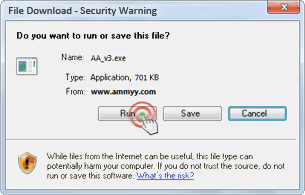
To begin working with Ammyy Admin you have to launch the application on the Operator's and the Client's PCs.
|
|
|
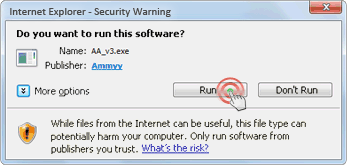
Security warning
|
|
Start application by clicking Run.
|
|
|
|
|
|
Step 2. Session start (Client)
|
|
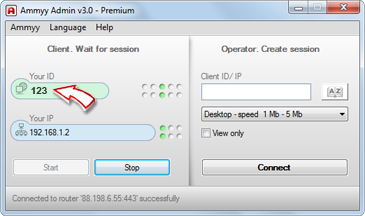
The Client has to give the ID or IP to the Operator in order to let him connect to the PC.
|
|
|
Session start (Operator)
|
|
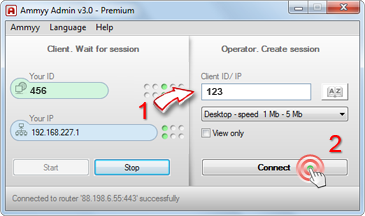
The Operator types in the Client's ID or IP (1) and clicks the connect button (2). Remote control will start in a few seconds.
|
|
|
|
|
|
Step 3. Client's PC control confirmation dialogue
|
|
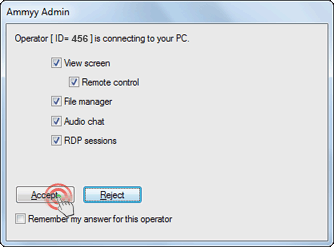
The Client has to grant connection for the Operator.
|
|
|
Session started
|
|
The Client's remote desktop will be available for control after authorization. You can use full-screen mode and work with a remote PC as if you're sitting right in front of it.
|
|
|
|
| 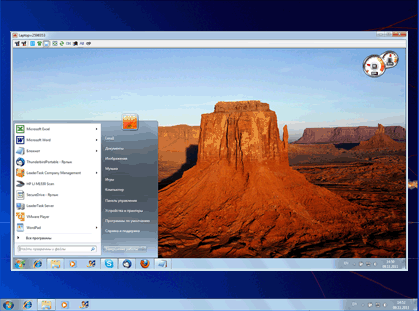
Connection settings, file manager (1), voice chat (2) and more are available on the control panel.
 |
|

 untuk menginstall driver pada windows 7 di perlukan beberapa softawre seperti power iso dan winrar . langkah awal 1. klik kanan pada iso d...

 on:absolute; top: 0px; right: 0px;" />

BalasHapusSuch a Nice post. Thanks for Awesome tips Keep it up
ammyy-admin-crack